
A savings goal in Savigo helps you plan, track, and stay motivated while saving for something important. Follow the steps below to create your first goal.
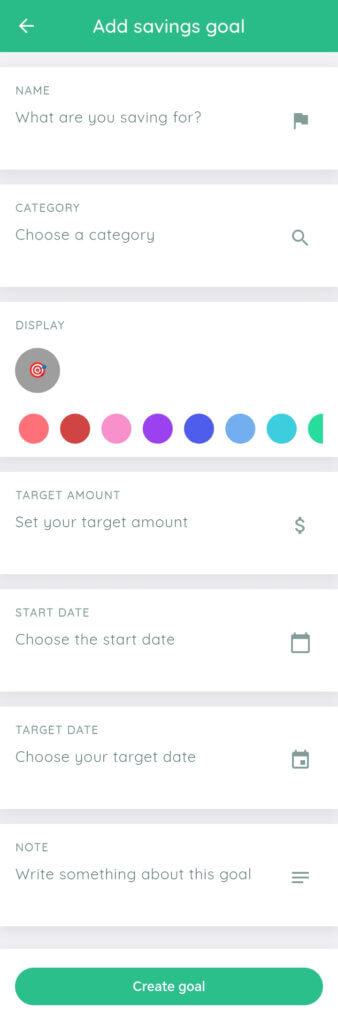
Step 1: Name Your Savings Goal
In the Name field, enter what you are saving for.
Examples:
- Emergency Fund
- New Phone
- Travel to Japan
- Wedding
✅ This field is required.
Choose a clear and meaningful name so you can easily recognize your goal.
Step 2: Choose a Category
Tap Choose a category and select the category that best fits your goal.
Examples:
- Travel
- Education
- Shopping
- Emergency
✅ This field is required.
Categories help organize your savings and give you better insights into your spending and goals.
Step 3: Choose an Icon and Color
Under Display, select an icon (or an image) and a color for your savings goal.
✅ This field is required.
Icons and colors make your goal easier to identify on your dashboard.
Step 4: Set Your Target Amount (Optional)
In the Target amount field, enter how much money you want to save.
Examples:
- $2,000
🟡 This field is optional.
If you are not sure yet, you can skip this step and update it later.
Step 5: Choose a Start Date (Optional)
Tap Choose the start date and select when you want to begin this savings goal.
🟡 This field is optional.
If not set, the goal will start immediately by default.
Step 6: Set a Target Date (Optional)
Tap Choose your target date to set a deadline for your goal.
🟡 This field is optional.
Setting a target date helps you stay motivated, but you can save without one.
Step 7: Add a Note (Optional)
Use the Note section to write additional details about your goal.
Examples:
- Why this goal is important
- Motivation or reminders
- A plan for how you will save
🟡 This field is optional.
Step 8: Create Your Goal
Tap Create goal to finish.
🎉 Your savings goal is now active and will appear in your goals list.
Helpful Tips
- Start with simple goals if you’re new to saving
- You can edit your goal later to add or change details
- Reviewing your goals regularly helps you stay on track